



New
Arrivals/Restock


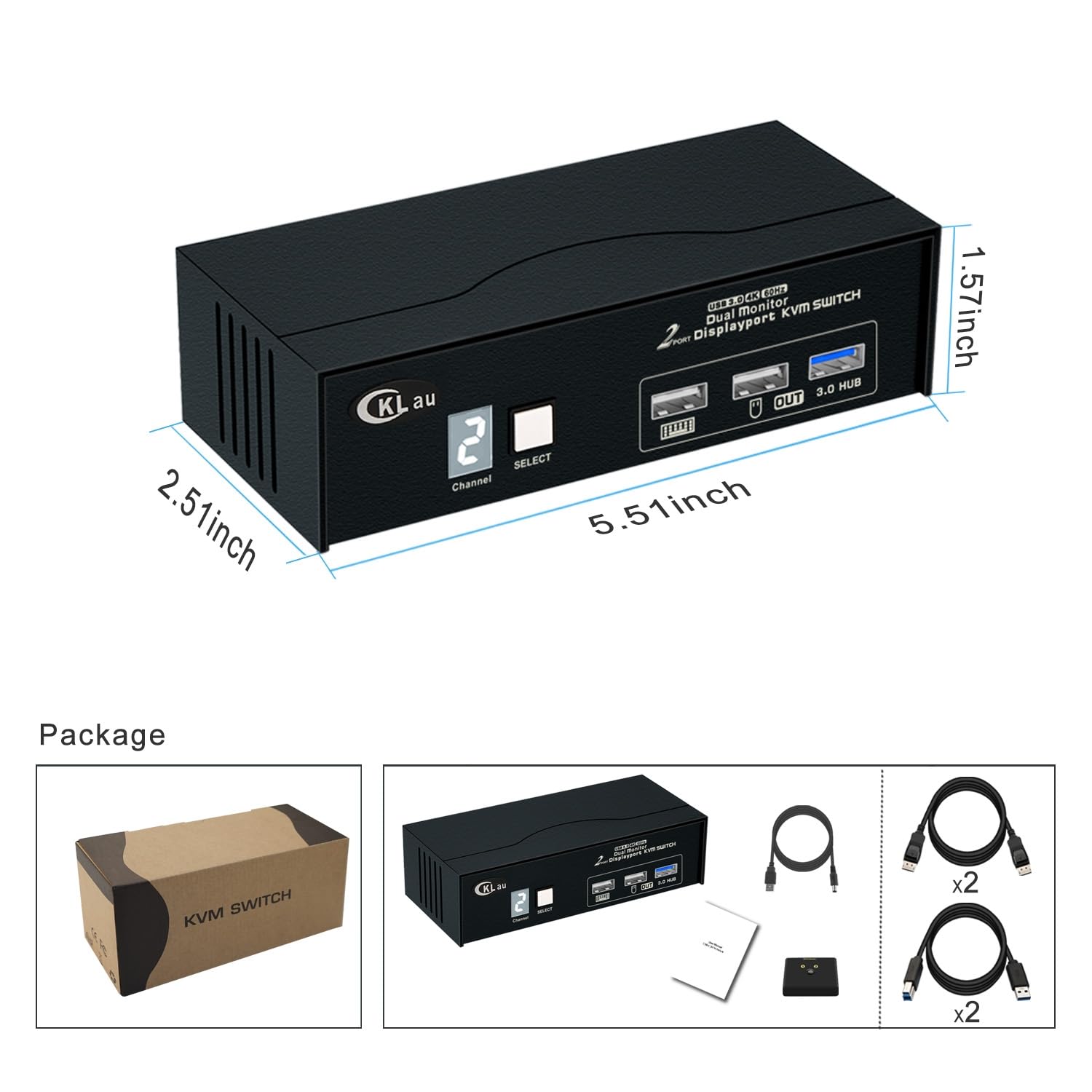

CKLau USB 3.0 2 Port Displayport KVM Switch 2 Monitor 2 Computers 4K60Hz 2K144Hz with Cables, DP 1.2 KVM Dual Monitor Keyboard Mouse Video Peripheral Switcher Box

 4.3 (53 items)
 Limited Time Sale
Until the end
20
06
39
$53.99 cheaper than the new price!!
Free shipping for purchases over $99 ( Details )
Free cash-on-delivery fees for purchases over $99
Free cash-on-delivery fees for purchases over $99
See all stores
Please note that the sales price and tax displayed may differ between online and in-store. Also, the product may be out of stock in-store.
New $89.99
Product details
| Management number | 216118037 | Release Date | 2026/04/19 | List Price | $36.00 | Model Number | 216118037 | ||
|---|---|---|---|---|---|---|---|---|---|
| Category | |||||||||
- 1. DP Monitor Switch for 2 Computers: allows 2 computers sharing one set of keyboard & mouse, 2 monitors, and 1 pcs USB 3.0 peripheral device. (Tips: 1. This is DP 1.2 KVM switch, please set your devices to 4K@60Hz or lower resolution before using. 2. This KVM switch without simulation EDID function.)
- 2. DP KVM Switch 2 Monitor 2 Computers: Supports manual button switching, and wired remote push button switching.
- 3. 2 Computers 2 Monitors Switch: Support wired/wireless/unify/Bluetooth keyboard/mouse, Apple keyboard (hotkey is changeable), etc. Support touch screen, OLED screen, 16:9 widescreen, 21:9 ultra-wide monitors, etc. (Bluetooth keyboard/mouse should with a receiver, it doesn't support built-in Bluetooth keyboard/mouse)
- 4. Displayport KVM 2 Monitor 2 Computers: Resolution compatible 4096x2160@60Hz, 3840x2160@60Hz, 3840x1620@60Hz, 3440x1600@60Hz, 3440x1440@60Hz, 3840x1080@60Hz, 3200x1800@60Hz, 2560x1440@60/120/144/165Hz, 2048x1536@60/120/144Hz, 2048x1280@60/120/144Hz, 2048x1080@60/120/144Hz, 1920x1200@60/120/144Hz, 1920x1080@60/120/144Hz, and lower resolution.
- 5. 2 Port KVM Switch Displayport: Package includes: 1* 2 port KVM switch+2 * USB 3.0 cables+2 * Displayport 1.2 cables+1 * power cable+1 * manual+1 * wire remote push button switch. (If you want to connect 2 computers and use dual monitor, you need to buy 2 pcs Displayport cables separately)
- 6. IMPORTANT TIPS: If only one computer is BIOS-based, start by turning it on, logging in, and waiting for the display. Switch to the second computer and turn it on. If both computers are BIOS-based, start the KVM, then the first BIOS computer, log in, wait for the display, switch the KVM to the second computer, and finally, turn on the second BIOS computer. In short, don't start both BIOS computers simultaneously to avoid issues like a black screen or disabling your keyboard and mouse.
| Model | CKLau-322D-3 |
|---|---|
| Brand Name | CKLau |
| Unit Count | 1.0 Count |
| Switch Type | Push Button |
| Circuit Type | 2-way |
| Contact Type | Normally Open |
| Manufacturer | CKLAU TECHNOLOGIES INC. |
| Actuator Type | Push Button |
| Material Type | Plastic |
| Mounting Type | Panel Mount |
| Connector Type | Usb |
| Control Method | Remote |
| Current Rating | 2 Amps |
| Operation Mode | ON-OFF |
| Controller Type | Push Button |
| Item Dimensions | 5.51 x 2.51 x 1.57 inches |
| Contact Material | Plastic |
| Operating Voltage | 5 Volts (DC) |
| Connectivity Protocol | Bluetooth |
KVM Switches


Milk Replacers





Correction of product information
If you notice any omissions or errors in the product information on this page, please use the correction request form below.
Correction Request Form